
Introduction

RISC’s clients, especially those in high-consequence industries – often face complex requirement management to ensure employee qualification, regulatory compliance and safe, environmentally-responsible operations. A request for guidance on managing just such a complex learning plan was recently received by the VTA Support help desk and became the catalyst for this blog post. Combining existing functionality like Team Requirements, Scheduled Report Favorites, and Output to Teams, a simple solution was created to get the right training assigned to the right people, at the right time. Let’s explore more.
Request
The VTA Support help request read:
Solution
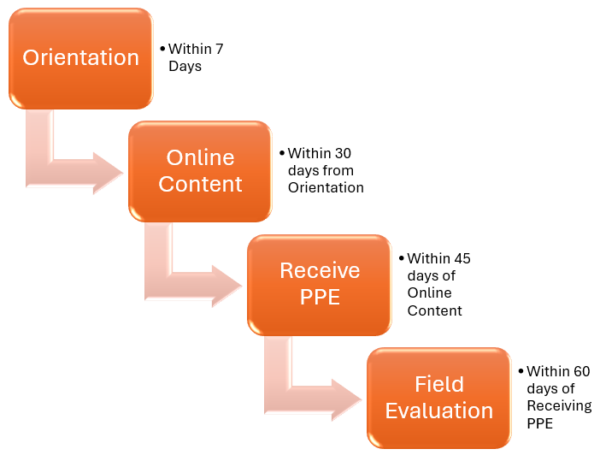
- Team 1: Instructor-Led Orientation
- Team 2: Web-based Module
- Team 3: Receiving PPE
- Team 4: Field Evaluation of Competence
Team 1: The initial Orientation
- Assign your Student pool as you would any other Team (Manually, Auto-Team, TMG or the HRIS data feed).
- Assign your new “Orientation” Course, due with a 7 day Grace Period from the Team Assignment Date.
Note that a course document can be used to provide a full scope of training, what to expect during the process, the student’s responsibility to Schedule, and even training locations.
Report Favorite 1: Attendance Report for Orientation with Output to Team
- Start the Attendance Report from Reports>Events>History Report Menu
- WHO: All Students
- WHAT: Orientation Course
- WHEN: All Dates – Since this is a new course no one has yet to take, the “All Dates” function will ensure we don’t miss any attendees.
- WHERE: Use the “Output To Team” File Type to send the results, anyone that has completed Orientation, to Team 2 for the Online assignment. Choose “Append” to just add new attendees to the team without modifying existing records.
- Save your Report as a Favorite so you can schedule it to run automatically and get students assigned to the next step, the Online content.
 Team 2: The Online Content
- Students are automatically assigned to the Online course via Team 2 by the Report Favorite discussed above.
- The Online course, assigned to Team 2 should be set due with a 30 Day Grace Period of the student receiving the team assignment.
Report Favorite 2: Attendance Report for Online Content with Output to Team:
- Start a new Attendance Report
- WHO: Team 2 – Those assigned the online content
- WHAT: Course Online Content
- WHEN: Use the “This Year” period as a safe bet in case the student has taken it before and you want the report to exclude previous completions.
- WHERE: Again, use the “Output To Team” file type with “Append”, but this time for Team 3 “Receive PPE”. This will add all the students attending the Online Conent to Team 3 for the issuance of PPE
- Just as before, save your Report as a Favorite so you can schedule it to run automatically and get students assigned to the next step, “Receive PPE”.
Team 3: Receive PPE
 Students are automatically assigned when they have completed Online Course using Report Favorite 2
- Assign Receive PPE course due within 45 Days.
Report Favorite 3: Attendance Report for Receive PPE “course” with Output to Team:
- Start a new Attendance Report.
- WHO: Team “Recieve PPE”
- WHAT: Course Receive PPE
- WHEN: “This Year” would allow you to exclude completions before this year.
- WHERE: : Use the “Output To Team” File Type, with “Append”, but this time for Team 4: “Field Evaluation of Competence”. This will add all the students who received their PPE to Team 4 for the Field Evaluation
- Again, save your Report as a Favorite so you can schedule it to run automatically and get students assigned to the next step, having a Field Evaluation.
 Team 4: Field Evaluation of Competence
- Students are automatically assigned when they have completed the Receive PPE course using Report Favorite 3, the attendance report showing they received their PPE.
- Assign Field Evaluation of Competence performance checklist due within 60 Days.
Summary
The approach discussed above got the Learning Manager exactly what they requested. By separating an existing Team of 4 Requirements into 4 Teams, with a single step of the respiratory training program assigned to each Team, it gave the user better control over when a step is assigned, and due, thereby making sure employees understand what is expected.
Do you have complex learning scenarios you want to explore? Never hesitate to reach out to VTASupport@risc-inc.com with your questions.

Mr. Welder’s career is founded in traditional instructional design and computer-based training development. He is a certified Development Dimensions International facilitator, a Kirkpatrick Certified Evaluator and facilitator of the Ohio State University curriculum development program. In addition to working in industry, Mr. Welder has held adjunct faculty positions at Bowling Green State University, Ohio and the College of the Mainland, Texas. Mr. Welder has been published in both Training Magazine as well as US Business Review.