
Unlocking Granular Data: A Deep Dive into cmi5 and xAPI for Modern Training Analytics
 Imagine launching a training course and only knowing if someone passed, failed or completed the training. Sure, knowing a learner’s score on a content element is important but how did they get to that score? Why did another student score better or worse? While there are several factors that can impact the result of training, one critical element is HOW the learner interacted with the content. These questions drove development of the RISC xAPI Statement Viewer and the enhancements for cmi5.
In SCORM, the standard does not address tracking details on a learner’s path through the content, what buttons were clicked, which interactions were engaged with or even what branch a student took through the material. Being limited to completion, pass/fail and a score results in using measures like completions per year or passing percentage to show our success in developing quality training. But is that true? Are these metrics just showing usage skewed by the fact that training is often required so my completion rate and passing percentage MUST be high or learners are out of compliance? If so, what can we do better? Now, using xAPI and cmi5 L&D teams can track every step learners take when interacting with content. This shift opens doors to real insights.
The Evolution Beyond SCORM
The Challenge of Legacy Data Tracking
 Consider for a moment what office technology looked like in January of 2000 – the month and year that SCORM was first published.
- Tower Computers with CRT Monitors were running Windows 98 (or maybe 2000).
- 5 inch floppy disc and CD-ROM stored files and loaded programs.
- eMail was replacing memos but you still had to have a fax machine and land line.
- Nokia’s 3210 was the mobile phone of choice until the 3310 came out in September.
- Digital projectors were starting to replace overhead projectors and acetate slides.
The SCORM standard is now more than 25 years old. Yes, it’s tried and true but it’s limited. Imagine telling a 2026 iPhone user they must use T-9 to write a text message. It works but now we KNOW there are so many more possibilities. SCORM sits at these crossroads. Every function of modern business runs on data – sales, marketing, manufacturing, human resource management. Yet SCORM locks data into a black box. You see completion rates or passing scores, that’s it. There’s no view into what learners skip or engage with, or the impact of learning activities on success.
Introducing CMI5 and XAPI: The Next Generation of Learning Standards
So where do we go from here? Enter xAPI. xAPI was really born out of two driving factors – data interoperability and robust data collection. That means data is standardized and is portable between learning record stores or other xAPI learning technologies without custom middleware and we can track everything a learner does in content, through online support platforms, other software systems and mobile apps. For more background on xAPI, visit the RISC interview with Andy Johnson, Specifications and Standards Manager at Lockwood Hills, LLC .
 But what does xAPI neglect? As a standard, xAPI doesn’t discuss launching content from a Learning Management System. SCORM was born out of the need to provide interoperability between content modules and Learning Management Systems where xAPI was purposefully un-burdened by the LMS to accommodate tracking of training outside the traditional LMS. What xAPI does allow are extensions and profiles for specific use cases. cmi5 is the use case for packaging and launching content from an LMS using xAPI. xAPI overcomes some of SCORM’s limitations because it can track all the detailed actions a learner takes inside the content, writing those to the learning records store while cmi5 completes the process by making xAPI content available in a traditional LMS. xAPI and cmi5 have rapidly gained acceptance and are now international standards under the IEEE.
Understanding the Core Concepts: xAPI vs. cmi5
XAPI: The Language of Learning Statements
 xAPI data forms the communication layer for cmi5. xAPI statements log learner activity like interactions with a content element. Good xAPI statements can show who accessed different content elements and how they interacted with them. When a user abandons a module, xAPI notes it allowing for tracking the history of a user’s interaction across multiple sessions. The granularity of xAPI data allows robust and flexible tracking beyond SCORM’s basics but must be thoughtfully planned to ensure useful data points are collected. Just tracking everything and hoping to make decisions on trends that emerge in the data is not a strategy for success.
cmi5: Structuring Data for LMS Integration
cmi5 is an xAPI profile that adds rules to xAPI for smooth LMS integration. It mandates session IDs to mark each launch of learning content. That session can then be used to show all the steps a learner takes until they exit. A new launch gets fresh ID. This makes tracking retries clear and allows for the comparison of results from one session or attempt from another. In addition to the raw log of xAPI data, cmi5 returns data like completion and score to the LMS. For more details on cmi5, read the RISC Inc Blog here.
Real-World Use Cases Driving Adoption
Case Study: Tracking Specific Learner Interactions
A RISC LMS client recently posed a question – how do we track a learner’s path through content? They were already developing cmi5 content with a popular, off-the-shelf Authoring suite. The instructional designer created branches within a content module that led to role-specific slides. In a SCORM world there was no native way to know what branch a student completed. Now, with the xAPI statements from the cmi5 course, this can be tracked by student and by session. Reports and analytics can now be based on this data to track the learners’ journeys though content, measure engagement, correlate path to success and cut waste by eliminating unused learning thoughtfully based on their use.
Exploring the RISC xAPI Statement Viewer enhanced for cmi5
Navigating Raw XAPI Statements
Raw xAPI in it’s JSON form may look messy at first. Following an Actor-Verb-Object pattern like “Duncan-Clicked-Engineering Branch” (a button) with raw data can be daunting. The cmi5 Data Viewer enhancement to the existing RISC xAPI statement viewer gives end-users a way to sort and group just the data they are looking for. It also leverages existing LMS data like student demographics allowing users to report on data by groups such as Departments, Job Titles, or Work Areas
Leveraging the cmi5 Data Viewer for Clarity
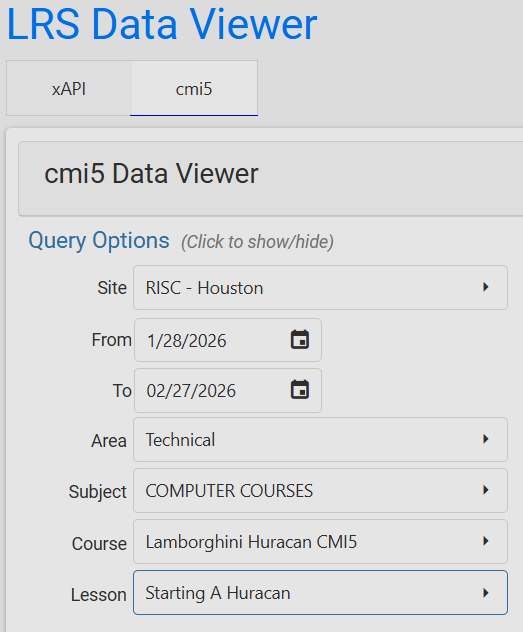
Clicking on the cmi5 Data Viewer option in the RISC xAPI Statement Viewer allow users to select cmi5 courses only. This eliminates the clutter of navigating through your course catalog and other, non-cmi5, xAPI statements. Because cmi5 specification requires an LMS to support up to 1,000 course lessons, you must pick the course and lesson you want to display
cmi5 Data Manipulation and Reporting
Once you’ve selected a course, you can drag columns, like actor or score, into the data grid. These columns allow for grouping of data. For example, if you want to see everyone that took a particular course in a time frame you can. Then sort by session ID. This displays the path a student took through training including each individual interaction, button click or page change if those are actions are instrumented with xAPI in the content. Clicking on the view icon (eyeball) for a statement row opens the raw JSON and you can click on the “Export XLSX” button to download a copy of the statements as filtered, grouped and sorted in the grid.
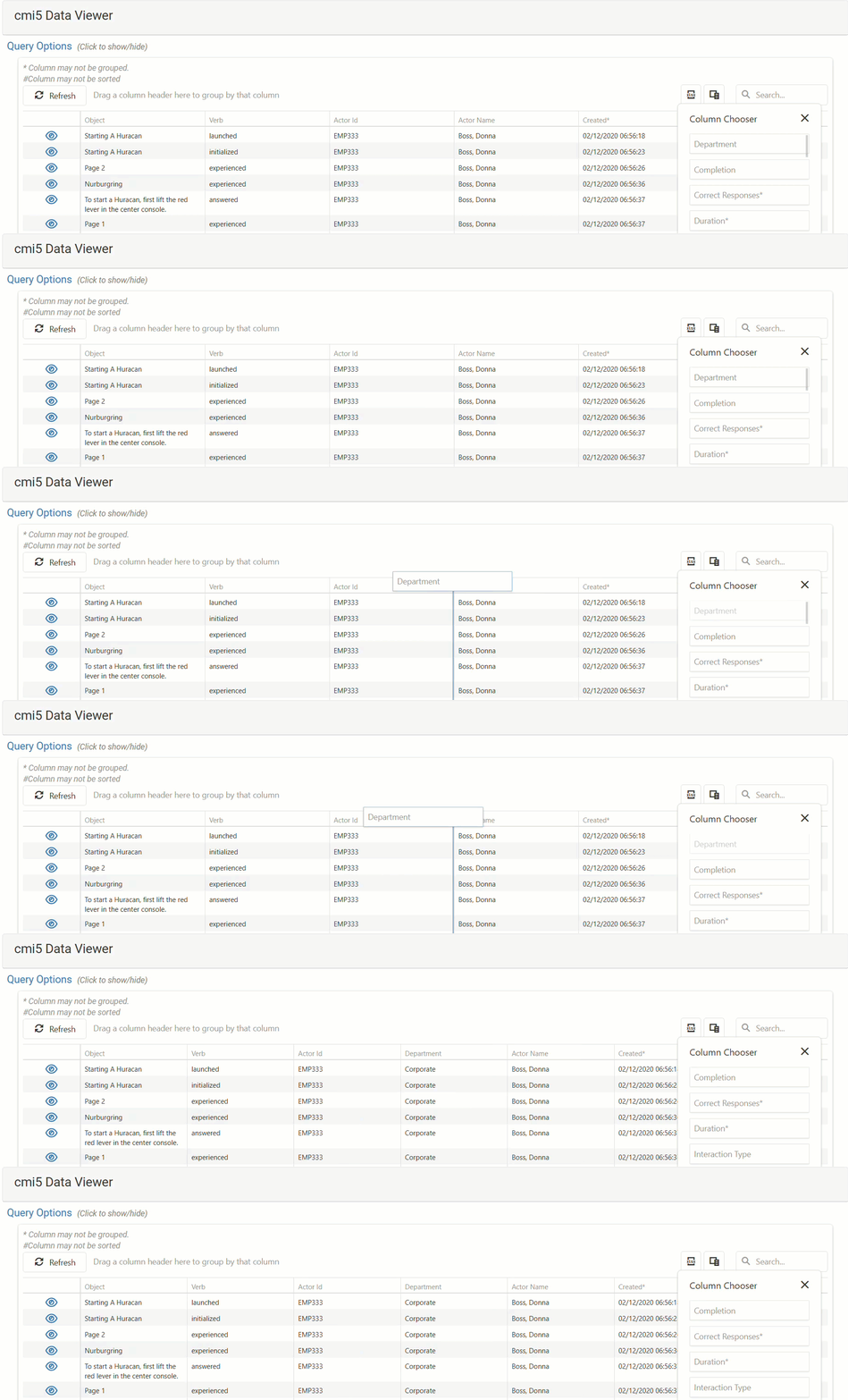 Here’s how it works:
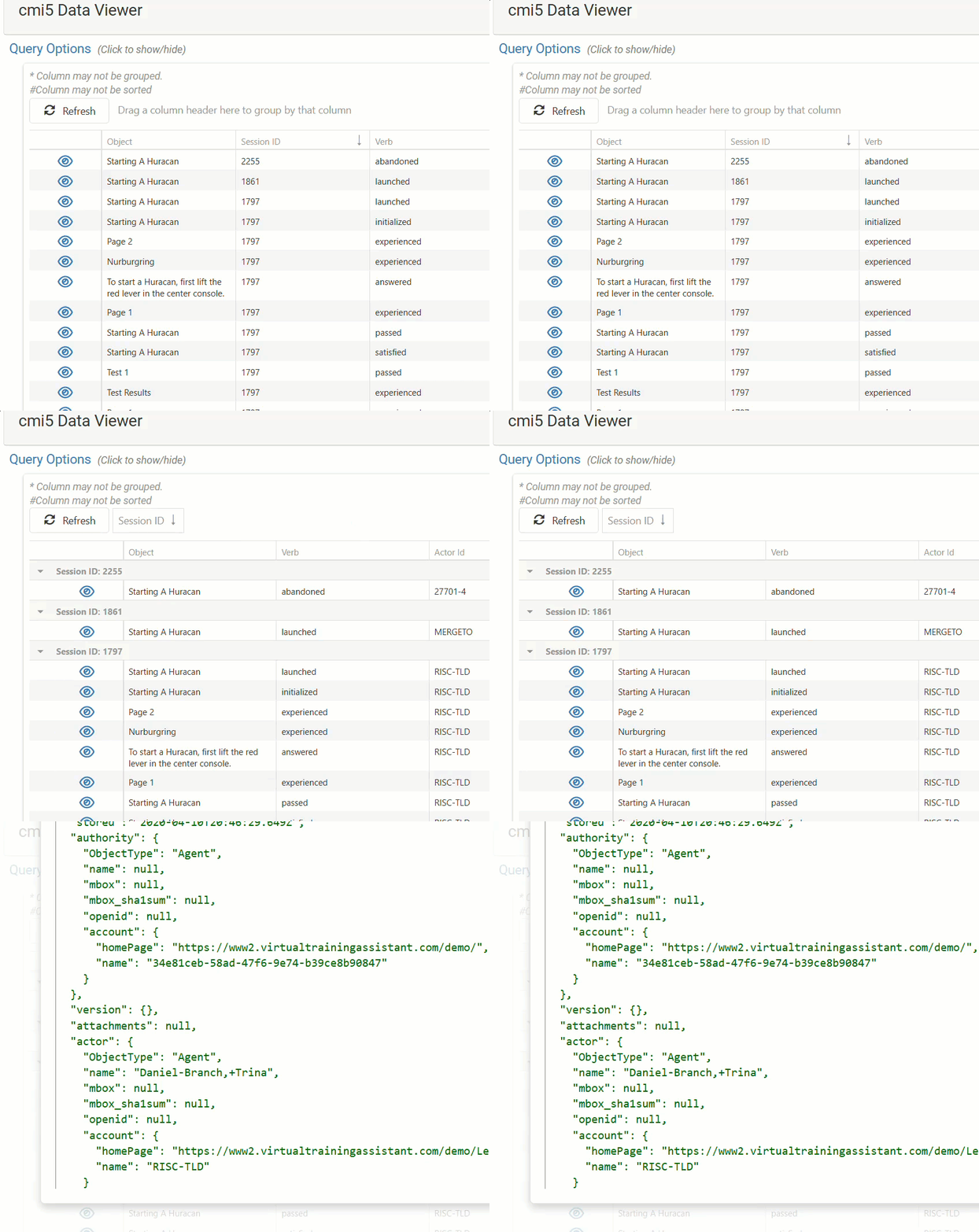 Filter to course.
- Add columns: actor, verb, object.
- Group and sort.
- Export results.
RISC’s LMS development roadmap includes continuing to expand the existing xAPI data visualization available in the LMS.
Strategic Implications for Content Development and Data Integrity
The Garbage In, Garbage Out Principle of xAPI Data
Bad names yield junk data. While every Authoring Tool is different, it is common for tools to use default names like page 1, page 2, button1, button 2 or even use a Universally Unique Identified (UUID) for objects. A UUID is just a long alpha-numeric string that is computer generated. Most tools do provide an option to name an object with a more usable name. Just like planning any report, it’s important to start with the end in mind and work backwards. If you want to report on the Engineering Branch versus the Accounting branch within a content module, name the button or menu option that opens the branch with something logical to report on.
Developer tips to avoid junk data:

-
- Define reporting/analytics needs up front.
- Name interactions.
- Test that you are generating the data you want early and often in case you need to make modifications.
Conclusion: The Path to Meaningful Learning Analytics
Key Takeaways on cmi5 and xAPI
xAPI opens a new realm for instructional designers to collect fine details on how learners interact with content. cm5 structures content using xAPI for launching and tracking in an LMS. While there are many, many SCORM modules that will not go away any time soon, consider cmi5 when publishing new content or re-publishing updated content. This allows you to ditch the SCORM black box for actual usage and success. This data isn’t only important for understanding what your learners did but may provide insight for streamlining and personalizing content moving forward. If there is an element in a content module that is not being used or doesn’t correlate to success, does it really need to stay or should it be eliminated? By planning your data needs, you can build better courses today, gain greater insight and cut waste – all while leveling up your learning analytics.
Want to learn more? Contact RISC today.

Mr. Welder’s career is founded in traditional instructional design and computer-based training development. He is a certified Development Dimensions International facilitator, a Kirkpatrick Certified Evaluator and facilitator of the Ohio State University curriculum development program. In addition to working in industry, Mr. Welder has held adjunct faculty positions at Bowling Green State University, Ohio and the College of the Mainland, Texas. Mr. Welder has been published in both Training Magazine as well as US Business Review.